Physical Address
304 North Cardinal St.
Dorchester Center, MA 02124
Physical Address
304 North Cardinal St.
Dorchester Center, MA 02124

CRUD stands for Create, Read, Update, and Delete. CRUD operations are basic data manipulation for the database. INSERT query is used to insert data in the database . SELECT Query is used to select a data from the database. UPDATE Query is used to update a data in the database and Delete Query is used to delete a data from the database. In this example we will learn how we can create crud application in CodeIgniter 4.
Download the fresh version of CodeIgniter from https://codeigniter.com/download and unzip this in your working directory and configure the base url in app/Config/App.php.
    public $baseURL = 'http://localhost:8080';
    To
    public $baseURL = 'http://localhost/crud/public';
In this step we will create database crud and table products in the crud database.
CREATE TABLE `products` (
 `product_id` int(11) NOT NULL AUTO_INCREMENT,
 `product` varchar(250) NOT NULL,
 `category` varchar(250) NOT NULL
 `price`bigint,
 `sku` varchar(150),
`model` varchar(150),
 PRIMARY KEY (`product_id`)
) ENGINE=InnoDB DEFAULT CHARSET=latin1
Now update the database credential in app/Config/Database.php.
public $default = [
		'DSN'      => '',
		'hostname' => 'localhost',
		'username' => 'root',
		'password' => '',
		'database' => 'crud',
		'DBDriver' => 'MySQLi',
		'DBPrefix' => '',
		'pConnect' => false,
		'DBDebug'  => (ENVIRONMENT !== 'production'),
		'cacheOn'  => false,
		'cacheDir' => '',
		'charset'  => 'utf8',
		'DBCollat' => 'utf8_general_ci',
		'swapPre'  => '',
		'encrypt'  => false,
		'compress' => false,
		'strictOn' => false,
		'failover' => [],
		'port'     => 3306,
	];
The model is used to communicate with the products table. So create model ProductModel in the app/Models/ directory and put the below code.
<?php
namespace App\Models;
use CodeIgniter\Model;

class ProductModel extends Model
{
        protected $table = 'products';
        protected $primaryKey = 'product_id';
        protected $allowedFields = ['product', 'category','price','sku','model'];
}
In this step we will create a controller named as ProductController. So create controller in the app/Controllers directory and put the below code .
<?php
namespace App\Controllers;
use App\Models\ProductModel;
use CodeIgniter\Controller;

class ProductController extends Controller
{
    private $product = '' ;
    public function __construct(){

        $this->product = new ProductModel();
    }

    // show product list
    public function index()
	{
        $session = session();
        $data['products'] = $this->product->orderBy('product_id', 'DESC')->findAll();
		return view('products',$data);
    }

    // insert data
    public function store() {

        $data = [
            'product' => $this->request->getVar('product'),
            'category'  => $this->request->getVar('category'),
            'price'  => $this->request->getVar('price'),
            'sku'  => $this->request->getVar('sku'),
            'model'  => $this->request->getVar('model'),
        ];

        $this->product->insert($data);
        $session = session();
        $session->setFlashdata('msg', 'Product Successfully Added');
        return $this->response->redirect(site_url('/list'));
    }

    // show product by id
    public function edit($product_id){

        $data['product'] = $this->product->where('product_id', $product_id)->first();
        echo json_encode($data['product']);
    }

    // update product data
    public function update(){

         $id = $this->request->getVar('id');
        $data = [
            'product' => $this->request->getVar('product'),
            'category'  => $this->request->getVar('category'),
            'price'  => $this->request->getVar('price'),
            'sku'  => $this->request->getVar('sku'),
            'model'  => $this->request->getVar('model'),
        ];
        $this->product->update($id, $data);
        return $this->response->redirect(site_url('/list'));
    }

     // delete product
     public function delete(){

        $id = $this->request->getVar('delete_id');
        $data['product'] = $this->product->where('product_id', $id)->delete($id);
        return $this->response->redirect(site_url('/list'));
    }

}
$routes->get('/', 'ProductController::index');
$routes->get('/list', 'ProductController::index');
$routes->post('add-product', 'ProductController::store');
$routes->get('edit-product/(:num)', 'ProductController::edit/$1');
$routes->post('update-product', 'ProductController::update');
$routes->post('delete-product', 'ProductController::delete');
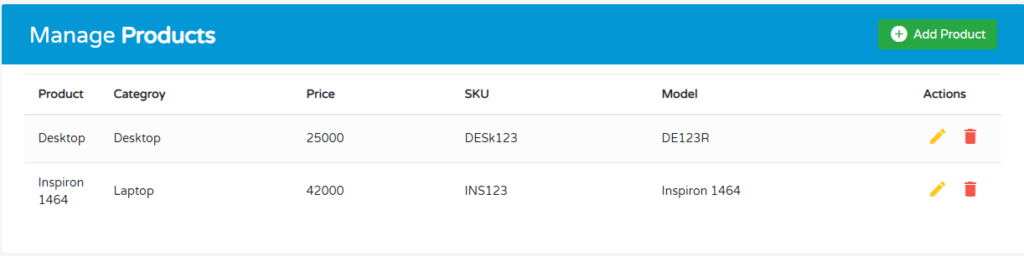
In this step post we will create a view inside the and app\Views directory named as products.php. So create a view file in the same directory and put the below code.
<html>
<head>
<link rel="stylesheet" href="https://fonts.googleapis.com/css?family=Roboto|Varela+Round">
<link rel="stylesheet" href="https://stackpath.bootstrapcdn.com/bootstrap/4.5.0/css/bootstrap.min.css">
<link rel="stylesheet" href="https://fonts.googleapis.com/icon?family=Material+Icons">
<link rel="stylesheet" href="https://maxcdn.bootstrapcdn.com/font-awesome/4.7.0/css/font-awesome.min.css">
<script src="https://code.jquery.com/jquery-3.5.1.min.js"></script>
<script src="https://cdn.jsdelivr.net/npm/popper.js@1.16.0/dist/umd/popper.min.js"></script>
<script src="https://stackpath.bootstrapcdn.com/bootstrap/4.5.0/js/bootstrap.min.js"></script>
</head>
<body>
<div class="container">
<div class="table-responsive">
<div class="table-wrapper">
<div class="table-title">
<div class="row">
<div class="col-sm-6">
<h2>Manage<b> Products</b></h2>
</div>
<div class="col-sm-6">
<a href="#addProductModal" class="btn btn-success" data-toggle="modal"><i class="material-icons"></i> <span>Add Product</span></a>
</div>
</div>
</div>
<table class="table table-striped table-hover">
<thead>
<tr>
<th>Product</th>
<th>Categroy</th>
<th>Price</th>
<th>SKU</th>
<th>Model</th>
<th>Actions</th>
</tr>
</thead>
<tbody>
<?php foreach($products as $product) { ?>
<tr>
<td><?=$product['product']?></td>
<td><?=$product['category']?></td>
<td><?=$product['price']?></td>
<td><?=$product['sku']?></td>
<td><?=$product['model']?></td>
<td>
<a href="#editProductModal" data-id="<?=$product['product_id']?>"class="edit" data-toggle="modal"><i class="material-icons" data-toggle="tooltip" title="Edit"></i></a>
<a href="#deleteProductModal" data-delete_id="<?=$product['product_id']?>" class="delete" data-toggle="modal"><i class="material-icons" data-toggle="tooltip" title="Delete"></i></a>
</td>
</tr>
<?php } ?>
</tbody>
</table>
</div>
</div>
</div>
<!-- Add Modal HTML -->
<div id="addProductModal" class="modal fade">
<div class="modal-dialog">
<div class="modal-content">
<form method ="post" action="<?= site_url('/add-product') ?>">
<div class="modal-header">
<h4 class="modal-title">Add Product</h4>
<button type="button" class="close" data-dismiss="modal" aria-hidden="true">×</button>
</div>
<div class="modal-body">
<div class="form-group">
<label>Product</label>
<input type="text" name ="product" id = "product" class="form-control" required>
</div>
<div class="form-group">
<label>Categroy</label>
<input type="text" name ="category" id = "category" class="form-control" required>
</div>
<div class="form-group">
<label>Price</label>
<input type="number" name ="price" id ="price" class="form-control" required>
</div>
<div class="form-group">
<label>SKU</label>
<input type="text" name ="sku" id = "sku" class="form-control" required>
</div>
<div class="form-group">
<label>Model</label>
<input type="text" name ="model" name = "model" class="form-control" required>
</div>
</div>
<div class="modal-footer">
<input type="button" class="btn btn-default" data-dismiss="modal" value="Cancel">
<input type="submit" class="btn btn-info" value="Save">
</div>
</form>
</div>
</div>
</div>
<!-- Edit Modal HTML -->
<div id="editProductModal" class="modal fade">
<div class="modal-dialog">
<div class="modal-content">
<form method ="post" action="<?= site_url('/update-product') ?>">
<div class="modal-header">
<h4 class="modal-title">Update Product</h4>
<button type="button" class="close" data-dismiss="modal" aria-hidden="true">×</button>
</div>
<div class="modal-body">
<div class="form-group">
<label>Product</label>
<input type="text" name ="product" id = "edit_product" class="form-control" required>
</div>
<div class="form-group">
<label>Categroy</label>
<input type="text" name ="category" id = "edit_category" class="form-control" required>
</div>
<div class="form-group">
<label>Price</label>
<input type="number" name ="price" id ="edit_price" class="form-control" required>
</div>
<div class="form-group">
<label>SKU</label>
<input type="text" name ="sku" id = "edit_sku" class="form-control" required>
</div>
<div class="form-group">
<label>Model</label>
<input type="text" name ="model" id = "edit_model" class="form-control" required>
<input type="hidden" name ="id" id = "edit_id" required>
</div>
</div>
<div class="modal-footer">
<input type="button" class="btn btn-default" data-dismiss="modal" value="Cancel">
<input type="submit" class="btn btn-info" value="Update">
</div>
</form>
</div>
</div>
</div>
<!-- Delete Modal HTML -->
<div id="deleteProductModal" class="modal fade">
<div class="modal-dialog">
<div class="modal-content">
<form method ="post" action="<?= site_url('/delete-product') ?>">
<div class="modal-header">
<h4 class="modal-title">Delete Product</h4>
<button type="button" class="close" data-dismiss="modal" aria-hidden="true">×</button>
</div>
<div class="modal-body">
<p>Are you sure you want to delete these Records?</p>
<p class="text-warning"><small>This action cannot be undone.</small></p>
<input type="hidden" id="delete_id" name="delete_id">
</div>
<div class="modal-footer">
<input type="button" class="btn btn-default" data-dismiss="modal" value="Cancel">
<input type="submit" class="btn btn-danger" value="Delete">
</div>
</form>
</div>
</div>
</div>
</body>
</html>
body {
	color: #566787;
	background: #f5f5f5;
	font-family: 'Varela Round', sans-serif;
	font-size: 13px;
	max-width:1540px
}
.table-responsive {
    margin: 30px 0;
}
.table-wrapper {
	background: #fff;
	padding: 20px 25px;
	border-radius: 3px;
	min-width: 1000px;
	box-shadow: 0 1px 1px rgba(0,0,0,.05);
}
.table-title {
	padding-bottom: 15px;
	background: #0397d6;
	color: #fff;
	padding: 16px 30px;
	min-width: 100%;
	margin: -20px -25px 10px;
	border-radius: 3px 3px 0 0;
}
.table-title h2 {
	margin: 5px 0 0;
	font-size: 24px;
}
.table-title .btn-group {
	float: right;
}
.table-title .btn {
	color: #fff;
	float: right;
	font-size: 13px;
	border: none;
	min-width: 50px;
	border-radius: 2px;
	border: none;
	outline: none !important;
	margin-left: 10px;
}
.table-title .btn i {
	float: left;
	font-size: 21px;
	margin-right: 5px;
}
.table-title .btn span {
	float: left;
	margin-top: 2px;
}
table.table tr th, table.table tr td {
	border-color: #e9e9e9;
	padding: 12px 15px;
	vertical-align: middle;
}
table.table tr th:first-child {
	width: 60px;
}
table.table tr th:last-child {
	width: 100px;
}
table.table-striped tbody tr:nth-of-type(odd) {
	background-color: #fcfcfc;
}
table.table-striped.table-hover tbody tr:hover {
	background: #f5f5f5;
}
table.table th i {
	font-size: 13px;
	margin: 0 5px;
	cursor: pointer;
}
table.table td:last-child i {
	opacity: 0.9;
	font-size: 22px;
	margin: 0 5px;
}
table.table td a {
	font-weight: bold;
	color: #566787;
	display: inline-block;
	text-decoration: none;
	outline: none !important;
}
table.table td a:hover {
	color: #2196F3;
}
table.table td a.edit {
	color: #FFC107;
}
table.table td a.delete {
	color: #F44336;
}
table.table td i {
	font-size: 19px;
}
table.table .avatar {
	border-radius: 50%;
	vertical-align: middle;
	margin-right: 10px;
}

/* Modal styles */
.modal .modal-dialog {
	max-width: 400px;
}
.modal .modal-header, .modal .modal-body, .modal .modal-footer {
	padding: 20px 30px;
}
.modal .modal-content {
	border-radius: 3px;
	font-size: 14px;
}
.modal .modal-footer {
	background: #ecf0f1;
	border-radius: 0 0 3px 3px;
}
.modal .modal-title {
	display: inline-block;
}
.modal .form-control {
	border-radius: 2px;
	box-shadow: none;
	border-color: #dddddd;
}
.modal textarea.form-control {
	resize: vertical;
}
.modal .btn {
	border-radius: 2px;
	min-width: 100px;
}
.modal form label {
	font-weight: normal;
}
This is how our CodeIgniter crud application looks like.